

Introducing the Museum Technology Landscape; And Why Your Stack Might Be Working Against You
The Museum Tech Problem We Want to Ignore
It’s a random Wednesday afternoon. One of your most valued members stops you in the hall and asks, “Do you not remember me?”
You stop dead in your tracks, heart immediately racing. “Of course I do!” They’re a long-standing member, a volunteer, a financial supporter, and one of your biggest advocates online.
“Well, someone doesn’t. I’m getting emails and texts promoting new membership deals. And don’t get me started on the ‘discount codes’ they’re sending. They’re not nearly as good as my membership discount!”
Right away you know what they’re talking about. You’ve been battling this for forever, it seems. Membership information doesn’t pass through to your engagement team, and marketing emails are so generic you’re surprised anyone opens them. You’re both left asking, ‘Why don’t all these systems talk to each other?”
In part it’s because the average museum is juggling no fewer than 9 categories of software. And most of that technology landscape is full of disparate, disconnected tools. What you need is a platform.
Let’s look at how this shows up in your daily operations.
● Blackbaud Altru alone is used by 8,500 institutions, and it's just one tool in one category.
● PastPerfect has 12,000+ museum users for collections. Yet, those museums still need separate CRM, ticketing, and fundraising tools on top of it.
- ● Tessitura serves 750+ organizations; setup alone costs $50k+ and still doesn't cover every category.
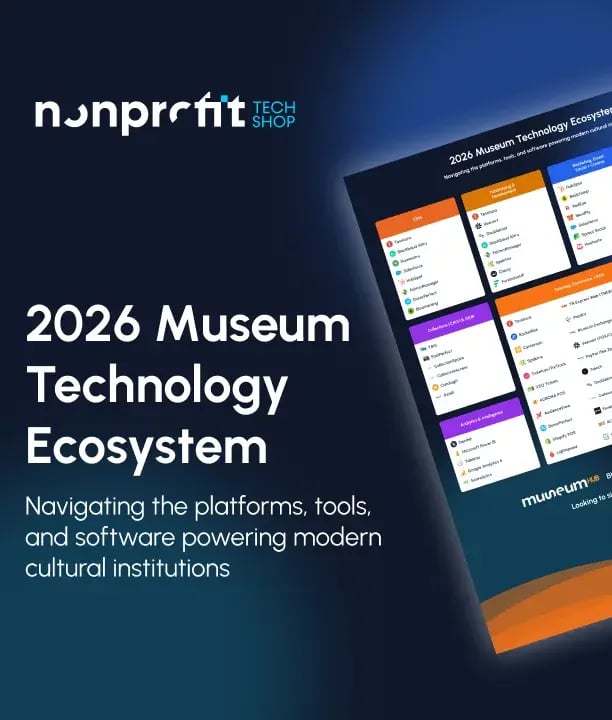
These numbers alone make the case: even the 'big' players don't eliminate the need for a stack. That’s why we created the Museum Technology Ecosystem. It’s time to see just how many tools your teams are juggling, and why your data might be siloed.
What the Museum Tech Ecosystem Covers: The 9 Categories
What exactly do the 9 categories we surfaced cover?
First, this is not necessarily every category of technology you, your staff, your volunteers, or even your board members use. Our goal is to highlight many of the main categories from small, local museums to multi-site juggernauts, and everyone in between.
Secondly, each category we explore surfaces a potential integration gap. Museums often have tools in 5-6 categories that were never designed to talk to each other.
Let’s walk briefly through all nine categories shown in the ecosystem map. Think of this as your personal tour of our exhibit, complete with interpretations to help you dig into your museum tech landscape and its evolving needs.
- ● CRM: Where you manage donor, member, and visitor relationships. It’s the communication engine.
- ● Fundraising & Development: Your campaign, grant, and donor management tools. Ever-vital revenue.
- ● Marketing, Email, Social + Comms: Critical outreach and communications platforms, which need data to thrive.
- ● Collections (CMS) & DAM: Managing objects, images, and digital assets means your team has critical data, and your online presence is well-fed.
- ● Ticketing, Commerce + POS: Admissions, events, and retail… important needs for any museum.
- ● Operations, Events & Grants: Back-office and venue management. These tools ought to play in the data pool well with others.
- ● Analytics & Intelligence: If CRM is the engine, this is the computer brain. Reporting, dashboards, and visitor insights live here.
- ● Website: CMS and web presence tools. Think of it as your virtual entryway or lobby.
- ● All-in-One Platforms: The tools that span multiple categories (key focus area). Some do many tasks well, others fall short where it counts. Hopefully when they fall a bit short, they act as a platform with critical integration power.
One category that isn’t prominent, yet, is an emerging 10th category: AI-powered visitor tools (Wonderchat, ChatLab, Chitchatbot.ai). While it’s not yet pictured, we anticipate it won’t be long before it’s a critical focus area. AI tools are definitely where the landscape is heading.
The Silo Problem: When Tech Doesn't Talk
Siloed tech isn’t just annoying. It’s costly. You’re likely already measuring real costs of what happens when systems don't integrate: duplicate records, missed touchpoints, staff burnout from manual workarounds, and unhappy members, supporters, and customers.
When the museum experience is less than lackluster, your bottom line suffers. Whether it’s long-term members getting first-time-visitor messaging, lapsed donors not being flagged, or event attendees never converted to members, revenue drops, bad reviews appear, and attendance suffers.
It doesn’t have to be this way. We can have connected, clean data.
Many tools your organization uses daily were built for specific functions, not for an integrated ecosystem. The more connected our personal worlds become, the more we all expect everything to “magically” work for us. And while you won’t find a magical one tech to rule them all, you should work toward building an operations platform that works for everyone your museum touches.
Oh, and it shouldn’t take a PhD to operate. Staff should be able to keep doing their jobs, volunteers shouldn’t need college classes to understand your tech, and change management shouldn’t make everyone panic.
Real-world costs of fragmented technology can look like this:
- ● Tessitura: $1,000–$3,000/user/year + $50k+ setup — enterprise museums can afford integration, smaller ones often can't
- ● SimpleTix: $0.79 + 2% per ticket — popular for smaller/mid-sized events, but likely doesn't integrate with a CRM
- ● PastPerfect (collections): $540–$960/year — most-used collections tool, but a standalone point solution
- ● Veevart: $135/user/month on Salesforce — integrates more broadly because it's platform-native
- This spectrum is the story: price doesn't equal integration. Cheap tools stack up; enterprise tools still require custom work
User-friendly technology isn't just about ease of use; it's about whether systems work together without manual intervention, and are friendly on budgets.
The Case for Platform Thinking
Here’s the honest truth: No single platform covers every need. But… having a connective core changes everything. That connective core is a platform. What makes a good platform?
When software is designed to serve multiple functions and connect with others, it’s a platform. This can show up as an app marketplace, an open API, or AI-friendly connectors for tools like Make, Tray, or Zapier.
The museum technology landscape makes this visible: certain tools appear in multiple categories because they were built as platforms, not point solutions. Tessitura appears in CRM, Ticketing, Fundraising, AND All-in-One. It’s the clearest example of platform thinking. Museum Hub, built on HubSpot, is another platform with powerful connectors through a marketplace and API connections.
The best-in-class modern platforms are built with open APIs and data structures that support AI-powered workflows, personalization, and reporting. These AI-friendly technology solutions help museums of all levels put data to work for their teams.
Of course, it’s not all sunflowers and butterflies. There can be a tradeoff: platforms require more setup and organizational buy-in. But in our experience in the technology space, platforms reduce integration overhead long-term.
One final example in the platform versus point solutions. Doubleknot shows up in multiple categories: CRM, Ticketing, Fundraising, and All-in-One. It’s especially popular with children's museums and science centers. Conversely, a single-category tool like PastPerfect or KORONA POS means your team needs to invest in other tools, and then connect them with third-party automation. And that’s only if these tools all work with those integrations.
Platform > point solution.
What AI Is Changing (and What It Isn't)
Artificial intelligence, AI, already shows up in your museum technology stack, quietly, and in ways that depend entirely on the foundation underneath it. CRM platforms offer predictive scoring to flag lapsed donors before they're gone. Collections tools are experimenting with automated metadata generation. Personalization engines can tailor email content based on a visitor's purchase and attendance history.
But here's the catch: none of that works if your data lives in silos.
AI tools are only as useful as the data they can reach. A predictive donor model trained on incomplete CRM records, because half your constituent activity lives in a separate ticketing system that never syncs, will give you incomplete predictions. Garbage in, garbage out, no matter how sophisticated the algorithm.
This is why the platform question matters so much right now. Museums running on Salesforce-based tools like Veevart or PatronManager are closer to AI-readiness than they may realize. Salesforce has invested heavily in its Einstein AI layer, and that infrastructure is already woven into the platforms built on top of it. A museum on a fragmented stack of five standalone tools faces a much steeper climb to get to the same place.
It's also worth noting where AI is heading in the visitor experience space. The emerging category of AI-powered engagement tools we referenced earlier (chatbots and virtual guides like Wonderchat, ChatLab, and Chitchatbot.ai) is emerging specifically for cultural institutions. These didn't make our main landscape this year, but they're worth watching.
The framing we'd suggest: don't ask "is my museum ready to use AI?" Ask "is my tech stack structured in a way that AI could actually use my data?" That's the more honest, and more actionable, question.
How to Use the Landscape
“So you made a pretty picture. So what? How can it help my museum?”
Great question. Here’s our goal, and our hope, with this new venture. We want museums to use it as a discovery tool: are there categories where you have no tool? Where do you have too many?
We also see this as a conversation starter with your team or board. Showing what’s in the industry can help kickstart the conversation many B2B revenue operations professionals take on: What tech is necessary and what can be cut, what’s outdated and needs to be updated, and how can we move toward a more platform-focused situation?
And finally, use this museum technology landscape as a benchmark. Are the tools you use reflected here? Are peer institutions using something you're not? This visualization will evolve. We’ve seen it in the marketing technology world through the work of Scott Brinker.
Technology evolves. Museums will need to as well.